If you have ever wondered why multiplayer servers cost so much to run, the short answer is that an online game has to stay switched on, keep up with every connected player at once, and move data in and out of a data centre all day and night. You pay for computing power that idles through the quiet hours, bandwidth for every byte each player sends, security systems, backups, and the engineers who patch it when something breaks at 2am.
That answer sounds obvious once you hear it, but the bill is rarely one big server. It is a pile of smaller things that each scale with a different variable, and which of them dominates changes completely between a 40-player co-op indie game and a live-service shooter with hundreds of thousands of people online.
Below is a plain-language breakdown of where the money goes, using real ranges from community forums and hosting providers rather than vendor marketing. If you are a player curious about the monthly fee, a parent wondering why the subscription exists, or a developer budgeting a first launch, the same information applies.
Table of Contents
- 1What Does It Mean to Run a Multiplayer Server?
- 2Why Multiplayer Servers Cost So Much to Run
- 3The Main Cost Categories at a Glance
- 4How Player Count Changes Server Costs
- 5How Much Do Multiplayer Servers Cost?
- 6Why Bandwidth and Network Traffic Cost So Much
- 7Why CPU, Memory and Storage Matter
- 8The Hidden Costs of Keeping Servers Online
- 9How Game Developers Control Server Costs
- 10Frequently Asked Questions
- 11Why do multiplayer games need a server instead of running entirely on players’ devices?
- 12Do multiplayer servers cost money even when the game is free to play?
- 13Is a more expensive server always better for players?
- 14What affects multiplayer server costs the most: CPU, bandwidth or player count?
- 15How can a game developer reduce server costs without reducing player count?
- 16Why do voice chat and anti-cheat increase the cost of a multiplayer server?
- 17Conclusion
What Does It Mean to Run a Multiplayer Server?
A multiplayer server is a computer that holds the authoritative version of a game. It is not a copy of the game sitting next to yours — it is the only version that decides what actually happened.
Here is what happens in the seconds after you press Join. Your client contacts the matchmaker, which finds a server with room and tells it a new player is arriving. The server reserves a slot, loads that player’s character, and starts running the simulation loop.
From then on, your device stops predicting and starts reporting. Your controller input goes up to the server, the server checks whether the action is legal, applies it, and broadcasts the new game state to every other connected client. Your screen is a rendering of that broadcast, not a private copy of the truth.
That design exists for a reason. If every player ran their own copy of the truth, someone would eventually edit it in their own favour. Central authority fixes cheating, keeps everyone roughly in sync, and makes matchmaking possible at all.
So there are really two separate things people blur together. The game logic — physics, animation, damage rules, AI behaviour — is the developer’s code. The hosting that runs it 24 hours a day is infrastructure: CPU, memory, network links, storage, monitoring and the humans who keep it alive. The code is written once. The hosting is paid for every hour of every day, whether anyone is playing or not.
Why Multiplayer Servers Cost So Much to Run
Six things drive almost every multiplayer hosting invoice. Understanding which of them grows with players, and which grows with time, is most of the battle.
- Always-on idle capacity. A server cannot be switched off between matches. Players log in at 11pm on a Tuesday expecting the same world they left at 11pm on Monday, so capacity has to be reserved through the quietest hours of the week even when 90% of it sits idle. Studios have to buy for their worst evening, not their average Tuesday.
- Bandwidth egress. Data leaving the data centre is billed, and in multiplayer it is relentless. Every player generates a constant stream of position updates in and out. At small scale that is trivial; at scale it becomes the single largest line on the invoice. Forum threads about costs almost always end up here eventually.
- CPU and memory headroom. A server simulates every match running on it at once. More concurrent players means more simultaneous physics, pathfinding and animation work. Memory is the awkward one, because it reserves in chunks — you pay for the block whether the match is full or empty.
- Tick rate and performance targets. Tick rate is how many times per second the server recomputes and rebroadcasts state. A configuration running 128 ticks per second does more than eight times the simulation work of a 20-tick setup. Tick rate is one of the most expensive words in netcode, and studios trade it away deliberately.
- Security and abuse prevention. DDoS mitigation, anti-cheat infrastructure, account and session protection and rate limiting all sit in front of the game server. These are running costs that never appear in the game itself but are non-negotiable for a public service.
- Human operations. Someone monitors dashboards overnight, patches exploits, investigates crashes, handles support tickets and moderates. On small teams this work quietly lands on the gameplay programmer. A Unity forum thread from an indie developer described server costs as the single biggest risk in shipping a live-service game, and the reason is usually this line, not hardware.
The Main Cost Categories at a Glance
Here is the same breakdown as a table, because the fixed-versus-usage split explains a surprising amount about multiplayer economics.
| Cost category | What it scales with | Fixed or usage-based |
|---|---|---|
| Compute (CPU and memory) | Concurrent players and tick rate | Mostly fixed once you reserve capacity |
| Bandwidth egress | Total data sent to and from players | Purely usage-based |
| Storage | Game assets, logs, player data, backups | Mostly fixed, grows slowly |
| Database services | Accounts, inventories, match records, writes | Usage-based, spiky at peak |
| Monitoring and logging | Number of servers and regions | Fixed, scales with fleet size |
| Backups and failover | Data volume and recovery targets | Fixed plus occasional heavy jobs |
| Security and DDoS defence | Attack surface and traffic volume | Subscription, often a fixed annual cost |
| Engineering and operations staff | Incident load, support volume, regions | Fixed, and often the biggest line for small studios |
| Player support and moderation | Number of players | Effectively per-player |
Read the third column carefully. The fixed costs are the ones that quietly punish a small game, because you carry them whether you have forty players or forty thousand. The usage-based ones punish a big game, because they grow with every person who joins.
How Player Count Changes Server Costs
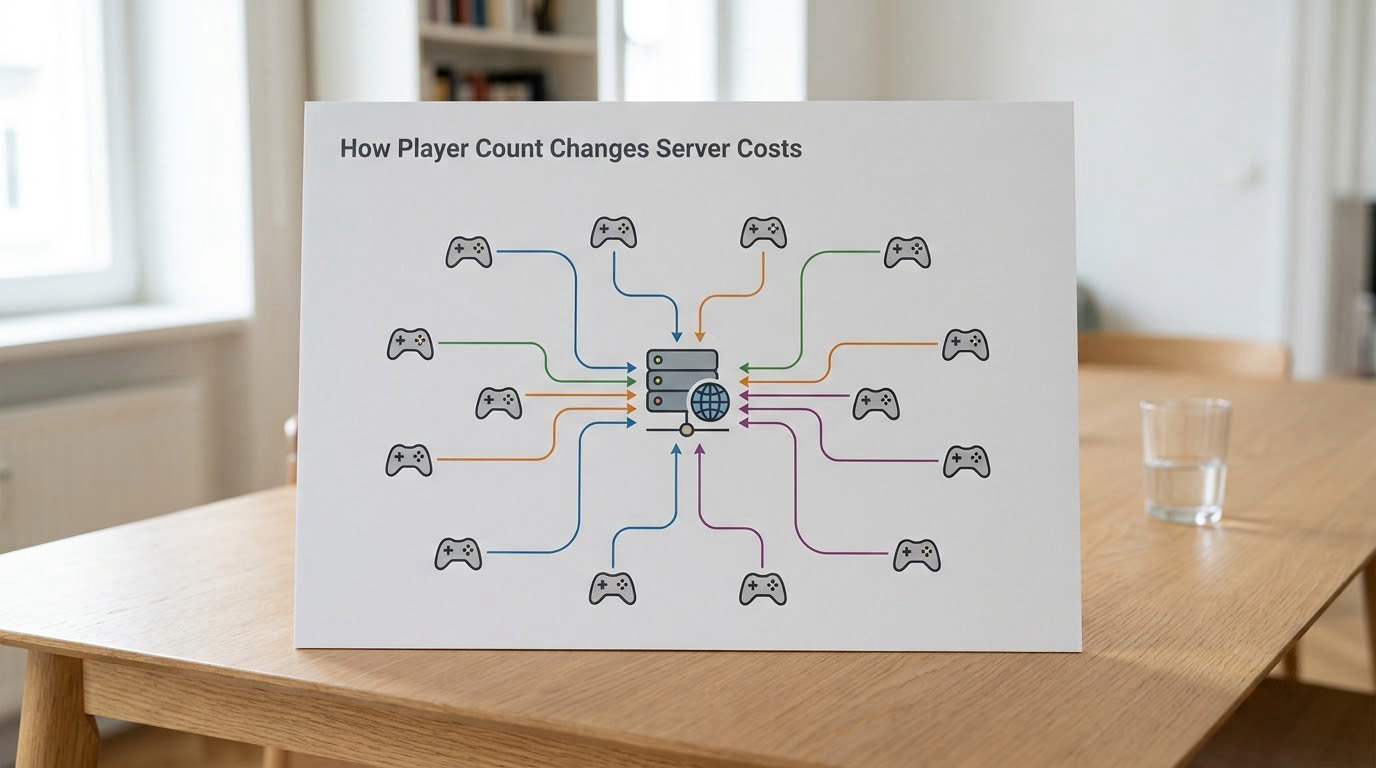
Concurrent players — usually written CCU — is the number everyone should watch. Not registered accounts, not daily logins, but the people connected to a server at the same moment.
Costs do not scale perfectly linearly, and the shape of the curve matters. A single machine can often absorb dozens of small matches cheaply, so the first few hundred players might cost almost nothing extra. Past the point where you need a second machine, you cross a provisioning boundary and the bill steps up. Then regional expansion adds whole new machines for players who would otherwise play fine but complain about ping.
Match size changes this too. Twenty-four players packed into one match concentrates the work on one server. Two hundred players spread across nine matches needs nine servers running. The same player count can produce very different invoices depending entirely on the game design.
How Much Do Multiplayer Servers Cost?
Exact figures vary by region, provider and game type, so treat anything you read — including the ranges below — as a shape rather than a quote.
| Type of game | Typical scale | Illustrative monthly server spend |
|---|---|---|
| Private community server | 10 to 40 players, one machine | A few dozen dollars |
| Small indie co-op or survival title | 100 to 500 concurrent | Low hundreds of dollars |
| Live-service shooter or strategy game | 10,000 to 50,000 concurrent | Thousands of dollars, up to tens of thousands |
| Regional fleet with failover and support | 100,000+ concurrent | Five figures a month and climbing |
A developer on the Unity forums described precisely this problem: per-gigabyte relay charges meant a sustained player count could wreck a small studio’s budget, because the bill grew with every person who stayed connected rather than with the number of people who bought the game.
One useful framing for the one-million-player question. A million registered accounts is a marketing number. A million people connected simultaneously, spread across regions, is a fleet of hundreds of machines plus a support organisation. Studios that quote the first number to describe their server budget are not being dishonest — they are just answering a different question.
Why Bandwidth and Network Traffic Cost So Much
Bandwidth is the most commonly underestimated line, because it behaves nothing like a machine. A machine has a fixed hourly cost you can predict. Traffic is billed per gigabyte, and gaming generates data continuously rather than in bursts.
Three words get used interchangeably here, and they are not the same. Bandwidth is the width of the pipe, measured in megabits per second. Transfer is the volume of data that moves through it, billed per gigabyte. Peak capacity is the maximum width you must reserve to survive your busiest minute. Providers charge for the transfer and reserve for the capacity, and both lines scale with traffic.
Not all traffic counts equally. Gameplay state is small and constant. Voice chat is enormous, because audio streams for every speaking player continuously. Anti-cheat adds server-to-client inspection traffic on top. Asset downloads — new maps, skins, the first time a player loads the game — are large one-time pushes that dwarf a normal session.
Every one of those adds up on the same meter, which is why compression, culling and smarter replication are cost engineering, not just performance work. Sending fewer bytes per player is one of the cheapest savings available.
Why CPU, Memory and Storage Matter
CPU is where the simulation lives. A server tick recomputes physics, animation, AI decisions and network state for every entity in the match, then does it again sixty, sixty-four or 128 times a second. That is why tick rate is the first thing studios cut when costs bite.
Memory is the other half. Every running match holds player state, world state and cached assets in RAM, and memory is provisioned in fixed blocks. A server sized for 40-player matches cannot be quietly repurposed for 100-player matches, which is why over-provisioning is normal and why idle capacity shows up on the bill.
Storage is the quiet one. Game assets, player profiles, inventories, match history and log files all live somewhere, and logs grow forever unless something deletes them. Backups multiply stored data again. None of this is expensive next to bandwidth, but it never goes to zero either.
Community server operators report the same pattern at a much smaller scale. The machine is the cheap part; the recurring cost is time spent on updates, moderation and backups.
The Hidden Costs of Keeping Servers Online
The infrastructure invoice is the part you can forecast. The rest is what turns a small team into a large one.
- Monitoring and on-call. Alerts have to be watched by a human at 3am, because the difference between a two-minute outage and a two-hour one is usually someone paying attention.
- Patching. Exploits and crashes get discovered within hours of a release, not weeks. Every fix is a deployment, and every deployment is a chance to break something else.
- Incident response. When matchmaking breaks during a weekend event, the cost is compute plus a very bad Sunday for whoever is on call.
- DDoS protection. A public game server is a target by default. Mitigation is usually a subscription plus routing overhead.
- Fraud and abuse. Gold farming, boosting, account selling and ban evasion are all operational problems with real staffing cost.
- Backups and failover. Redundant capacity in a second region means paying twice for the insurance policy.
- Moderation and support. Community operators consistently name this as their largest recurring cost, and it does not appear on any hosting invoice at all.
There is a commercial risk too. Shutting a live game down is read by players as taking away something they bought, and that backlash threat is why studios keep unprofitable servers running far longer than the arithmetic suggests. It changes what a studio is willing to cut.
How Game Developers Control Server Costs
Every studio manages this bill, and the levers are reasonably well understood.
- Autoscaling up and down. Run extra capacity at launch, on weekends and during events, then scale back. This turns some fixed cost into usage-based cost.
- Queueing instead of overflowing. When a region is full, players wait in a queue rather than joining a server that cannot support them. Slower peak, much cheaper.
- Right-sizing instances. Match sizes are chosen so a known number of fits on a known machine shape, which makes autoscaling predictable.
- Pooling and sharding. Games share idle machines rather than reserving one server per region that may sit empty.
- Compressing and culling traffic. Smaller packets and smarter state replication cut the bandwidth bill directly.
- Choosing tick rate deliberately. Halving the tick rate roughly halves simulation work. Competitive titles resist this; most other genres do not need it.
- Scheduling non-urgent work. Backups, analytics and log processing move to cheap off-peak compute.
- Passing some cost to players. Subscriptions, cosmetic stores and premium queues all exist partly because servers are not free. On console, a store cut commonly cited in player discussions is taken from sales before the developer pays anything at all.
Peer-to-peer networking is the cheapest option on paper because the players’ machines do the work. It is also the model players like least, because match quality depends on the host’s connection and because the host can cheat with their own game. A developer on Reddit described moving off cheap hosts onto more expensive infrastructure specifically because player complaints and churn dropped, which lowered the effective cost even though the invoice went up.
Frequently Asked Questions
Why do multiplayer games need a server instead of running entirely on players’ devices?
A server holds the only authoritative version of the match. Without it, every player runs their own copy of the game state, which means someone can change their own copy and there is no way to agree on who won. A central server also handles matchmaking, keeps clients roughly in sync, and gives anti-cheat something trustworthy to check against. That is why most competitive and progression games need one, while small co-op or indie titles sometimes get away without.
Do multiplayer servers cost money even when the game is free to play?
Yes, and free-to-play games usually cost more to run per player than paid ones, because everyone downloads the assets and many play at once. Revenue comes from cosmetic purchases, battle passes, premium queues or subscriptions, and part of that goes straight to server bills. Console and store platforms also take a cut of sales first, so the developer is funding servers from what remains.
Is a more expensive server always better for players?
No. More hardware mostly buys lower latency, more concurrent capacity and more headroom, and players notice lag far more than raw spec. A well-tuned cheap server in the right region can feel better than an expensive one on the wrong continent. The gains flatten out quickly too: once the tick rate is stable and nobody is rubber-banding, extra cores are mostly wasted money.
What affects multiplayer server costs the most: CPU, bandwidth or player count?
Bandwidth egress, and it scales with player count anyway, which is why the two are hard to separate. CPU is usually the largest fixed cost because capacity has to be reserved for peak hours. Player count on its own is not a cost driver unless it pushes you past a provisioning boundary and forces another machine or another region.
How can a game developer reduce server costs without reducing player count?
The levers are autoscaling up at peak and down overnight, queueing instead of running underpowered servers, sharing idle machines through pooling, compressing network traffic, and lowering tick rate where the genre allows. Moving backups and log processing to off-peak compute and choosing the right regions to minimise latency also cut the bill without anyone noticing.
Why do voice chat and anti-cheat increase the cost of a multiplayer server?
Both add traffic and work that the core simulation does not need. Voice chat streams continuous audio for speaking players, and it is heavy even though it looks like nothing on screen. Anti-cheat inspects client memory and adds server-side authority work plus extra network inspection on every connection. Both costs appear on the same bandwidth meter as gameplay.
Conclusion
If you only track one number, make it peak concurrent players, then multiply it by the data each player sends. Bandwidth is what turns a popular game expensive, and idle capacity is what keeps a quiet one expensive anyway.
Everything else follows from that: tick rate decides your CPU bill, regions decide how many machines you need, and humans decide whether any of it stays up at 3am on a Sunday. Once you can separate those, understanding why multiplayer servers cost so much to run stops being mysterious and the ways to cut it become obvious.