Browser based MMOs work behind the scenes by splitting the game in two: a server owns the shared world, and your browser renders it and sends your actions up. That one split explains lag, rubber-banding, instant saving, and why trades stay honest. Below is the whole chain, from your keystroke to the frame you see.
I’ve pulled this apart layer by layer because the jargon hides a fairly tidy design. Once you can name the parts, the strange parts of playing an MMO stop being strange.
The eight layers behind every browser MMO
- The browser client that draws the game
- The live connection that carries messages both ways
- The authoritative server that owns the truth
- The tick loop that advances the world on a fixed clock
- Client-side prediction, so movement feels instant
- Persistence, so your character survives a closed tab
- Sharding and interest management, so one world holds thousands of players
- The economy, monetization and moderation running quietly underneath
Table of Contents
- 1What Is a Browser-Based MMO?
- 2How Browser Based MMOs Work Behind the Scenes
- 3What Happens When a Player Takes an Action?
- 41. Input, render loop, and the frame you see
- 52. The server checks what you asked for
- 63. The world advances on a fixed tick
- 74. Updates go out, and latency is the gap
- 85. The client reconciles and moves on
- 9The Main Parts of a Browser MMO
- 10The browser client
- 11The gateway and the network
- 12The authoritative game server
- 13The database, matchmaking and admin tools
- 14How Browser-Based MMOs Stay Playable for Thousands of Players
- 15Regions and sharding
- 16Interest management
- 17Tick rate, snapshots and load balancing
- 18How Accounts, Progression, and Items Are Stored
- 19What lives in the database
- 20What stays in memory
- 21What happens while you are logged off
- 22Why Browser Games Can Feel Different From Desktop MMOs
- 23Frequently Asked Questions
- 24Do browser MMOs use WebSockets or regular HTTP?
- 25Why does a browser MMO feel less responsive than a downloaded MMO?
- 26How do browser MMOs stop cheaters when everything runs on my own computer?
- 27Is my progress really saved in a browser game, or can I lose it?
- 28How many players can one browser MMO server handle?
- 29Can a browser MMO support a large, stable community?
- 30Conclusion
What Is a Browser-Based MMO?
A browser-based MMO is a massively multiplayer online game that runs entirely inside a web browser tab or app window, with the server holding all game state and pushing updates to your screen over a live connection such as a WebSocket. Your device draws the world and sends your actions; the server decides what is actually true.
That makes it different from a single-player browser game, which is just a program that happens to run on a web page. A single-player game owns everything locally, so it can be finished, cracked or modded without anyone noticing. A browser MMO cannot work that way, because a hundred strangers are standing in the same marketplace with you.
It is also not the same as a private world. Private servers are usually a separate community-run copy with its own rules, separate player base and often separate code. They are a valid way to play, but the architecture underneath is the same one described here.
And it is not the same as a downloadable MMO. The transport layer changes, the rendering budget changes, and the security model changes. Everything else, including the tick loop and the database, stays recognisably the same. The comparison comes back later in this article.
How Browser Based MMOs Work Behind the Scenes
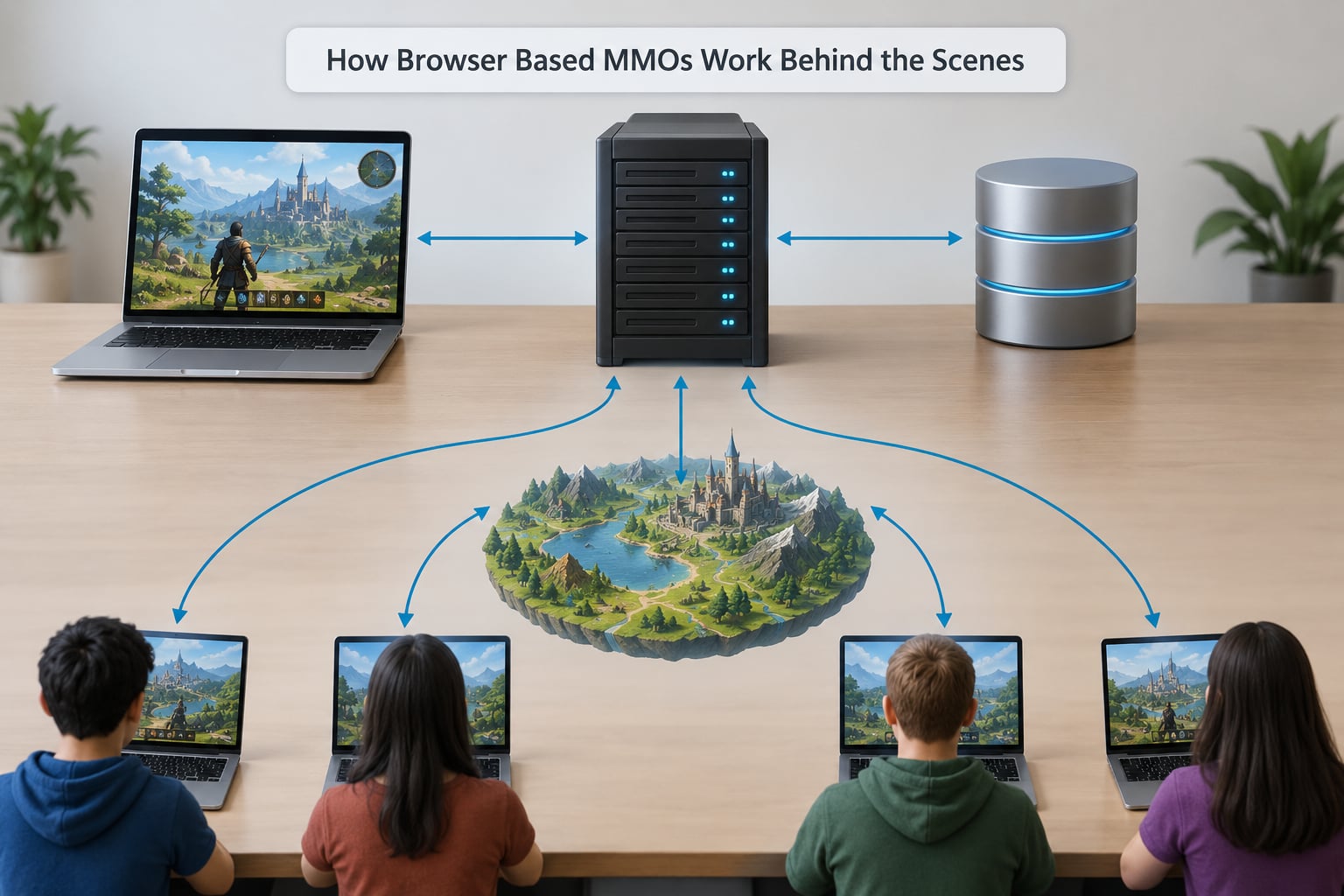
Here is the short version: the browser sends a small set of instructions, the server checks them against the real state of the world, and the server decides what every player sees next. Your screen never decides anything important on its own.
Take a simple example. You click on a field at coordinate 412, 88 and your character starts walking toward it. Your client does not simply move the character, because if it did, you would be trusting your own machine with a shared world. Instead it sends a short message to the server that says, roughly, “character 8842 wants to move to 412, 88.”
The server looks up character 8842, checks whether that character is alive, whether it is allowed to be there, whether something is in the way and whether it has the stamina. If all of that passes, the server updates its own copy of the world and schedules the new position for the next update. Everyone who should know about that movement, including you, gets told.
Your client then draws the character at the new spot. If that spot is a few pixels off from what you expected, your client quietly nudges it into line rather than snapping you backwards. That quiet correction is called reconciliation, and it is the reason good browser MMOs feel smooth while careless ones feel twitchy.
What Happens When a Player Takes an Action?
Every action travels the same path, whether it is a swing of a sword, a trade, a line of chat or a quest turn-in. Here is the cycle in order.
1. Input, render loop, and the frame you see
Your browser listens for clicks and keys. Almost every browser game runs its logic inside a loop called requestAnimationFrame, which fires roughly every 16 milliseconds to match a 60 hertz screen. Drawing is separated from thinking, so a slow frame makes the game choppy rather than slow.
When you click, the client records the intention and, for movement, usually applies it locally right away. That local application is the prediction step, and it is the only place your own machine gets to be right on its own.
2. The server checks what you asked for
The request arrives through a session-authenticated connection. The server reads the character from its own state, then validates: is this character yours, are you alive, are you in range, do you have the cooldown, is the target visible, is the action on cooldown. If a check fails, the request is dropped or corrected and your client is told the truth.
Cooldowns, stamina, range and line of sight are all server-side numbers. They live in the world model, not in your browser’s memory, which is exactly why a modified client cannot buy you a second attack.
3. The world advances on a fixed tick
The server does not process actions one at a time whenever they happen. It runs on a fixed timestep, often 10, 20 or 30 ticks per second, and on each tick it advances movement, timers, cooldowns, spawns and damage. A fixed clock is what keeps the simulation stable and replayable, and tick rate is the number that describes it.
4. Updates go out, and latency is the gap
After a tick, the server sends each client only the changes it needs to see. That message set might be a compressed binary blob of nearby entities, or JSON if the project never grew past hobby scale. Your browser applies it, re-renders, and repeats.
Latency is simply the round trip between your machine and the server, and it is measured in milliseconds. Anything that has to survive the round trip feels delayed, which is why prediction exists for movement and why an instant trade confirmation feels better than an instant movement step.
5. The client reconciles and moves on
When the update lands, your client compares the server’s version of your character with the one it predicted. If they agree, nothing visible happens. If they disagree, the client snaps to the server’s version and replays any inputs that came after, which keeps a long session from drifting.
The Main Parts of a Browser MMO
The browser client
The client is JavaScript, HTML and CSS, sometimes with WebGL or WebAssembly doing the heavy drawing. The 2D Canvas API is simpler and fine for a top-down or text-adjacent world. WebGL and its WebGPU successor handle 3D and thousands of sprites at once. A WebAssembly build of an engine written in C++ or Rust is the other common route, and the difference for players is mostly fidelity.
The client also handles input, prediction, interpolation between updates and the entire interface. It is a renderer with opinions, not a decision maker.
The gateway and the network
Players do not usually talk to the game server directly. A gateway holds the WebSocket connections, handles login and session tokens, routes each message to the right server, and pushes outgoing traffic back out. Most browser MMOs talk over WebSockets, with Socket.IO a common wrapper that adds reconnection and room handling.
Older projects polled regular HTTP requests, which works but wastes requests on empty answers. Long polling was the middle step. WebTransport and WebRTC data channels show up in a few projects where latency matters more than raw adoption.
The authoritative game server
This is where the world actually lives. It owns positions, health, inventory, quests, territory and the rules that decide outcomes. It simulates on a fixed tick, validates every request against its own state, and broadcasts updates. A server described as authoritative is exactly this: the only thing whose version counts when two versions disagree.
The database, matchmaking and admin tools
Long-lived player data lives in a relational database or a key-value store: characters, items, quest progress, guild rosters, leaderboard totals and purchase records. Matchmaking and party or guild lobbies usually run as separate services that hand a match or a channel to the game servers. Admins and moderators get tooling on top: log viewers, ban lists, rollback tools and economy dashboards.
There is one more quiet piece. A CDN usually serves the code, art, sounds and the initial world data, because those files are large and identical for every player. Serving them from a CDN is what lets a small studio run a big world on a small budget.
How Browser-Based MMOs Stay Playable for Thousands of Players
Nobody runs one process for every player on earth. The world is deliberately broken into pieces that can be handled separately, and no single machine has to hold everything.
Regions and sharding
A region is a separate world with its own population. Sharding means a player lives on one shard, so their progress and the world they play in are separate from another shard. It is the easiest way to scale, and the easiest way to lose a community: a dying shard feels dead because everyone you know has gone elsewhere.
Inside a shard, server processes are split by role. Login and character services handle sessions and characters. World or zone servers run the simulation for a piece of the map. Chat and social services handle guilds, parties and mail. Load balancers pick a process for a new connection and move it when one gets crowded.
Interest management
Even a large shard does not send you everything. Interest management means the server only tells your client about the entities that matter to you: what is in the zone you are standing in, plus the neighbouring zone so you see someone walking in. When you cross a boundary, you get a fresh set.
This is the single biggest reason a browser game can work at all. A zone with 200 players does not need to describe 4,000. It describes 200, and the server keeps a lightweight list of everyone else so it can hand them over in the right order when the boundary moves. Once you see that, it is obvious how browser based MMOs work behind the scenes at a thousand concurrent players: nothing is simulated for everybody at once.
Tick rate, snapshots and load balancing
A 20 tick server advances the world every 50 milliseconds and sends updates around that often. Combat feels better at higher tick rates, and idle worlds cost less at lower ones. The server often sends deltas, meaning only what changed since the last update, rather than a full snapshot of every entity.
Load balancing is simpler than it sounds: watch queue depth and CPU on each process, then add capacity or spread players across more of them. In practice the hard part is not the machines, it is keeping a persistent world consistent while players are spread across all of them.
How Accounts, Progression, and Items Are Stored
Your progress is not held in the page. It lives on the server, and the browser only holds a session token that proves who you are. That distinction is why you can close a tab mid-fight and come back to the same character.
What lives in the database
Permanent player data includes the account, the character list, level and experience, equipped gear, bag contents, quest flags, guild membership, leaderboard totals, market listings and any purchase record. Most of this is written on change rather than continuously, because writing every frame would be pointless overhead.
Accounts authenticate with a normal login, then get a token the client resends with every request. Developers moving from web apps to games treat this as the biggest stumbling block, and they are right: the habit of trusting a session to mean everything is exactly the habit an MMO cannot afford.
What stays in memory
Game state is different. Where a monster is right now, who is in combat, which projectiles are mid-flight and how much damage a swing did all live in the running server’s memory. They change many times a second and would never survive a restart as individual rows.
Between the two sits the cache: fast storage holding recent activity, hot leaderboards or a session’s chat backlog. Caches are disposable, which is also why they are the first thing to rebuild after an outage. The rule of thumb is simple: if losing it would ruin someone’s character, it belongs in the database.
What happens while you are logged off
The world keeps running. Timers, spawns, territory changes and other players all continue without you, because the world is not attached to your session. When you log back in, the server loads your saved data, rebuilds your position from whatever is still running, and often hands you a summary of what changed while you were away. Some games run a limited offline simulation for your own progress, such as a capped training queue, and cap it deliberately so nobody gains by simply closing the game for a week.
Why Browser Games Can Feel Different From Desktop MMOs
The convenience is real, and so are the tradeoffs. Here is the honest comparison.
| Factor | Browser MMO | Downloaded MMO |
|---|---|---|
| Install and first run | Open a link and play | Download, install, patch, update |
| Input feel | Good, with prediction hiding some lag | Usually tighter, with direct input paths |
| Graphics ceiling | Limited by browser memory and asset budget | Limited by the machine’s GPU |
| Devices | Laptops, phones, tablets, school and office PCs | Mostly desktops and consoles |
| Security | Server validates everything; client is assumed tampered | Client-side checks plus server validation |
| Deep tabs | Tab throttling and GC pauses can cause stutter | Full control of the process |
Input is the honest weak spot. Browser games route clicks and keys through the page, then through JavaScript, then to the render loop, and that adds a small amount of work a native client skips. A well-tuned browser MMO hides it with prediction, interpolation and careful timing. A badly tuned one feels sticky, and no amount of marketing fixes that.
Graphics go the other way. A native client can push more detail because it owns the whole machine. A browser game has to live inside a tab that is also running email and six other things, so art is usually leaner, sprites simpler and effects cheaper.
Accessibility is a genuine browser advantage. A link can be shared into a chat and opened by anyone instantly, and the same build often works on a phone, a Chromebook and an old office desktop without a separate port. Nothing about the architecture forces a keyboard-and-mouse setup.
Frequently Asked Questions
Do browser MMOs use WebSockets or regular HTTP?
Most use WebSockets, often through a Socket.IO style wrapper that handles reconnection and rooms. Older browser projects polled plain HTTP requests, which works but wastes traffic on empty responses. Long polling was the middle step. Whichever transport is used, the game logic is the same: the server owns the state and the client only renders and predicts.
Why does a browser MMO feel less responsive than a downloaded MMO?
Three things add up. Your input passes through the page and JavaScript before it reaches the game loop, tab throttling can pause the loop when the page is not focused, and garbage collection in the JavaScript runtime can cause short stutters. Predicting your own movement and interpolating between updates hides most of the network delay, but none of the other three costs go away.
How do browser MMOs stop cheaters when everything runs on my own computer?
They never trust the browser. The client is treated as tampered with by default: damage, cooldowns, range, inventory limits and item ownership are all resolved server-side, and a request that fails a check is refused no matter what the client claims. Opening devtools and changing a value changes nothing authoritative. What a cheater can still do is spam requests, so servers add rate limits, behaviour checks and human moderation on top.
Is my progress really saved in a browser game, or can I lose it?
Your permanent progress is written to the server database, not kept in the page, so closing a tab or clearing browser data does not delete your character. Anything the world is simulating, such as your position or a fight in progress, exists only in memory and is usually rebuilt or forfeited on reconnect. The risk worth knowing about is a server that saves too rarely, which is why well-run games write on every meaningful change.
How many players can one browser MMO server handle?
There is no single number, because the ceiling depends on tick rate, how much each player costs and how much interest management trims the work. A zone server running a few hundred players at a moderate tick rate is unremarkable, and a shard made of many such processes can hold thousands comfortably. The design trick is that no process ever has to handle the entire world at once.
Can a browser MMO support a large, stable community?
Yes, as long as population is spread across shards and regions rather than crammed onto one machine, and as long as guilds, trade and chat all keep working at low population hours. The failure mode is not technical capacity but social death: a small shard where nobody is online becomes a dead shard. Studios that keep cross-shard chat, trade and mail running tend to hold communities together.
Conclusion
If you take one idea away, make it this: the server owns the shared world and the browser displays it and submits your actions. Everything else hangs off that split, and that is the whole of how browser based MMOs work behind the scenes.
It explains why you can play on a school laptop with no install, why your character is still there after you close the tab, why a trade cannot be faked, why nobody’s memory editor buys them better gear, and why a laggy browser game feels different from a laggy desktop one. The world runs whether you are looking at it or not, on a fixed tick, in small pieces, sending you only what is nearby.
Next time a browser MMO stutters or snaps you back a step, you know which layer to look at: prediction failed, or the connection took longer than usual.