Anti-cheat software is a security service that runs alongside an online game to detect and block cheat tools. It checks your PC’s memory and game files against known cheat signatures, watches for injected code and suspicious drivers, verifies that game files are untouched, and analyses your gameplay for patterns a human could not produce. Anything it flags usually goes to review rather than an instant ban.
Most players only notice it when something goes wrong: a launch that fails because a driver is missing, or a suspension weeks after they last played. Both reactions make sense, because the system is deliberately quiet about what it finds.
This guide covers the parts that matter for anyone playing competitive PC games, choosing what to install on their machine, or trying to work out why their account was restricted.
Table of Contents
- 1How Anti-Cheat Software Works: A Quick Overview
- 2The four moving parts
- 3Prevention and punishment are separate
- 4What Does Anti-Cheat Software Actually Check?
- 5Modified game files
- 6Unauthorized memory changes
- 7Injected code and unknown modules
- 8Impossible movement and results
- 9Abnormal input patterns
- 10External tools and drivers
- 11Account behaviour
- 12How Client-Side and Server-Side Detection Differ
- 13What the server can see that your PC cannot hide
- 14Why layered detection is more reliable than either alone
- 15Why Anti-Cheat Software Uses Multiple Detection Layers
- 16File integrity checks
- 17Memory scanning
- 18Code-signature and driver monitoring
- 19Gameplay anomaly detection
- 20Hardware fingerprinting and account reputation
- 21Update and reporting
- 22Can Anti-Cheat Software Read Your Files or Record Your Screen?
- 23What anti-cheat legitimately needs
- 24What a player can actually check
- 25What Happens When a Cheat Is Detected?
- 261. A signal is raised
- 272. Data is sent to the publisher
- 283. Confidence is weighed
- 294. A human reviews it
- 305. Enforcement lands, sometimes much later
- 31What enforcement can look like
- 32How to Reduce False Positives and Keep Your Account Safe
- 33Use official game files
- 34Keep drivers and system software current
- 35Be careful with overlays, macros and third-party tools
- 36Do not touch the anti-cheat files yourself
- 37If you deleted an anti-cheat by accident
- 38If you think a ban is wrong
- 39Frequently Asked Questions
- 40Can anti-cheat software detect every cheat?
- 41Does anti-cheat software automatically ban players?
- 42Why does anti-cheat software flag a legitimate program?
- 43Can anti-cheat software be used in single-player games?
- 44Does anti-cheat software permanently ban an account after one mistake?
- 45How can I appeal an anti-cheat suspension?
- 46The Takeaway: What to Do First
How Anti-Cheat Software Works: A Quick Overview
Anti-cheat works in layers. A client-side component starts with the game and inspects the machine. A driver component may load earlier, at a deeper level of the operating system. A server-side component validates what actually happened in the match. And an update system keeps pushing new detection rules as cheats change.
That last layer matters more than people expect. Anti-cheat software is not a one-time scan for a fixed list of bad programs. It is a rolling intelligence system that gets new signatures and new behavioural models every time the cheating scene moves.
The four moving parts
- Client monitoring runs inside or alongside the game process and watches memory, modules and loaded files.
- Driver-level monitoring sits in the kernel on some titles, which lets it see drivers and actions that ordinary software cannot.
- Server validation checks whether the events the client reported are physically plausible.
- Update and reporting systems push new rules to the client and send suspicious data to the publisher’s servers.
Prevention and punishment are separate
Here is the distinction most arguments about anti-cheat miss. Detection is the observation. Prevention is what the game does about it, which can be as mild as refusing to queue for a match. Punishment is a separate decision made later by the publisher, and it may never happen at all.
So an anti-cheat system that flags something is not the same as a system that bans you. A flag on its own is close to meaningless. What matters is how confident the evidence is, whether a person reviews it, and whether the publisher’s rules treat it as a first offence or a pattern.
What Does Anti-Cheat Software Actually Check?
Anti-cheat looks for evidence of tampering rather than proof of intent. The signals it works from fall into a few groups, and most real detections combine more than one of them.
Modified game files
The shipped executable and its assets carry checksums. If a file on disk no longer matches what the publisher signed, that is a signal worth acting on, whether it came from a cheat, a corrupt download or an over-eager mod.
Unauthorized memory changes
A running game reads and writes to its own process memory constantly. Anti-cheat scans those regions for known cheat code, for values that fall outside legal ranges, and for regions that have been made writable when they should not be. This is the same category of work a virus scanner does, pointed at one process instead of a disk.
Injected code and unknown modules
Cheats often arrive as a library loaded into the game process. Anti-cheat enumerates the modules the game has loaded and checks each one against known-good lists, which catches both obvious cheat overlays and unexpected DLLs that nobody has seen before.
Impossible movement and results
Movement speed, position changes, view angles and fire rates are all compared against limits the game itself sets. A player who crosses a map faster than the engine allows, or whose aim snaps in ways no controller produces, produces data the server can question even if the client looks clean.
Abnormal input patterns
Automated aiming tends to produce input that is more consistent than human input. Reaction times that never vary, perfectly smooth corrections and clicks that land on frame-perfect intervals are the kinds of statistical fingerprints behaviour models look for.
External tools and drivers
Overlay software, macro tools, input-injection hardware and unknown kernel drivers can be part of a cheating setup even when they never touch the game files. Anti-cheat enumerates running drivers and installed services, and on kernel-level titles it can do that before any game is open.
Account behaviour
A new account on a fresh machine that immediately plays at a very high skill level, or one account that appears across many machines, is interesting for a different reason. Patterns of accounts, sessions and hardware identifiers carry signal too.
How Client-Side and Server-Side Detection Differ
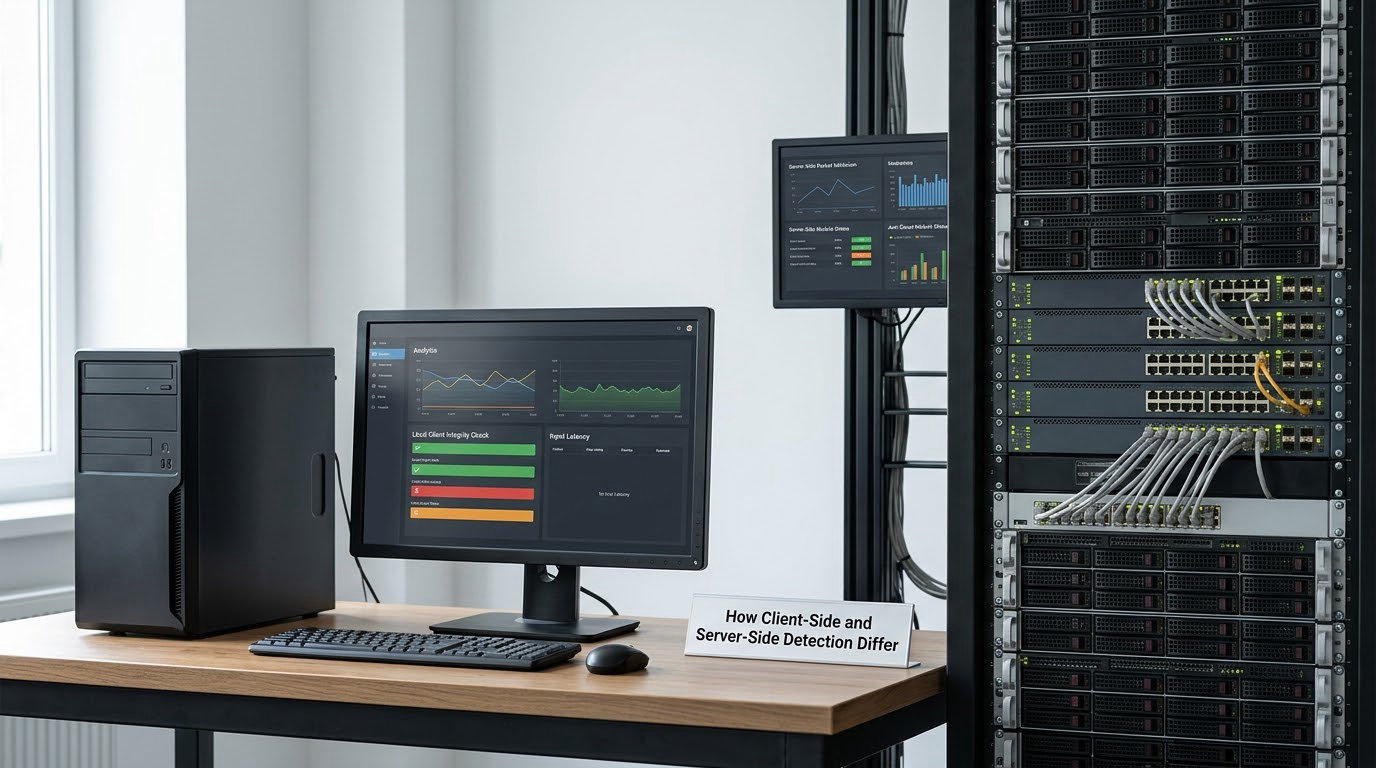
Client-side detection runs on your machine. It is fast, specific and close to the evidence, but it is also the half you control: everything it reports comes from a computer you own, which is exactly why server-side checks exist.
Server-side detection runs in the publisher’s data centre. It never touches your PC. It sees the stream of events from a match and asks whether they make sense in the context of the game and the other nine players.
The two answer different questions. Client-side checks ask whether anything on this machine has been tampered with. Server-side checks ask whether this match could have happened.
What the server can see that your PC cannot hide
A cheat that runs entirely on your machine still has to produce results through the network. The server sees movement that outruns the movement model, hit registration that lands at angles no crosshair placement could generate, and information used before it could possibly be seen on screen.
This is why bans land on players who insist their computer was clean. From the outside, a clean client producing impossible events is a normal signature of a cheat, and the server cannot tell the difference from the evidence it has.
Why layered detection is more reliable than either alone
Client-only detection is defeated by cheats that leave no trace on the machine. Server-only detection produces false positives on legitimately good players, because genuinely excellent play and cheating can look similar in aggregate data. Together they are much harder to fool, because a cheat has to defeat the local checks and still produce plausible gameplay for hours.
That combination is the real reason anti-cheat is worth the system resources it costs. No single test is convincing. Several tests agreeing usually is.
Why Anti-Cheat Software Uses Multiple Detection Layers
Each layer catches a different kind of cheat and misses a different kind. Here is how anti-cheat software stacks them, and where each one stops working.
File integrity checks
The simplest layer. The game is verified against the publisher’s signed manifest before launch and at intervals afterward. It reliably catches file-aimed cheats and unauthorized modifications.
It also catches innocent things. A cosmetic mod, an outdated mod loader or a file touched by antivirus software can all trip it, which is why this layer produces most false-positive complaints from players.
Memory scanning
The running game process is scanned for known cheat code, invalid data and regions with suspicious permissions. This catches cheats that never touch disk and exist only in memory while the game runs.
Weak points are obfuscation and encryption of the cheat payload, which push detection toward heuristics about behaviour rather than exact byte patterns.
Code-signature and driver monitoring
Anti-cheat enumerates loaded modules and, on kernel-level titles, installed drivers. Known cheat drivers are matched by signature; unknown or unsigned drivers competing for the same hardware resources are treated as suspicious because legitimate software rarely needs that access.
This is the layer aimed at the hardest cheats, and also the layer that worries players most, because it is the one that reaches deepest into the operating system.
Gameplay anomaly detection
Statistical models compare a player’s performance against what is achievable. Sustained accuracy far above the realistic ceiling, reaction times too consistent, and statistical outliers across thousands of matches all feed this category.
The difficulty is calibration. A good player and a cheating player produce similar distributions, and developers on developer forums consistently describe false positives here as the hardest problem in anti-cheat, harder than catching cheats outright.
Hardware fingerprinting and account reputation
Permanent enforcement requires identifying the machine, not just the login. Anti-cheat systems collect identifiers such as motherboard and system serial numbers, storage identifiers and network hardware addresses, then combine them with account history.
This is why a hardware ban follows you past a new account. It is also the data players ask about most, since it is the only collection with a durable effect on you personally.
Update and reporting
New cheat signatures, new behavioural models and new hardware identifiers get pushed continuously. Detections are sent to the publisher rather than enforced instantly, which sets up the delayed enforcement players find so confusing.
Can Anti-Cheat Software Read Your Files or Record Your Screen?
Short answer: the technology can do far more than recording a screen, and players should judge anti-cheat software by what its developer publishes and how it behaves, not by what is theoretically possible.
Be precise about the capability. A kernel-level driver sits at the highest privilege level ordinary software can reach. It can read memory, inspect files and observe input. What it cannot do is quietly hand your browser passwords to a third party, because that would be a data breach any competent vendor would avoid. Experienced users on r/pcgaming make exactly this point: kernel-level anti-cheats do not open the kernel up to the outside world, they use the same privileges your antivirus software uses.
That distinction matters and is often lost in the argument. Deep access is not the same as data theft, and the two get treated as identical in most forum threads.
What anti-cheat legitimately needs
- Game and process memory, to scan for cheat code
- Loaded module and driver lists, to spot injected components
- Crash diagnostics, which is the least controversial thing any anti-cheat collects
- Cheat signatures and behaviour data, the whole point of the software
- Hardware identifiers, when enforcement needs to outlast an account
What a player can actually check
- Read the vendor’s published privacy policy before installing, not after a ban.
- Confirm the driver is digitally signed through Windows driver signing and, on systems that display it, check the publisher name on the driver properties page.
- Watch what the service does at startup, since kernel-level titles load before you launch a game.
- Check whether it is still running after you uninstall the game, which is a common and legitimate complaint.
Policies differ by product and change over time. Treat any claim about data collection as belonging to a specific vendor’s published policy at a specific date, not as a general property of anti-cheat.
What Happens When a Cheat Is Detected?
The path from a suspicious moment to an enforced penalty has several stages, and most players only ever see the last one.
1. A signal is raised
Something trips a rule: a signature match, an integrity failure, a driver the anti-cheat does not recognise, or a server-side anomaly. Nothing happens to your account at this point.
2. Data is sent to the publisher
The client uploads relevant files, logs and identifiers. Server-side anomalies are generated by the match itself, so no upload is needed at all.
3. Confidence is weighed
A single low-confidence signal is usually discarded. Multiple signals agreeing, or one high-confidence detection from a known cheat, is a different matter. Repeat offences on an account raise the weight further.
4. A human reviews it
Most publishers route flagged accounts to a review process rather than acting automatically. The outcome depends on the evidence and the publisher’s policy, which can range from a warning to a permanent ban.
5. Enforcement lands, sometimes much later
This is the part that catches people out. Ban waves arrive in groups, days or weeks after the session that produced the flag, sometimes after you stopped playing entirely. Players describe this repeatedly, and it explains the common experience of being suspended after uninstalling the game.
What enforcement can look like
- A warning or a short matchmaking restriction
- A temporary suspension of ranked or competitive play
- A permanent account ban
- A hardware ban, which blocks the machine’s identifiers regardless of account
Hardware enforcement is the reason private cheats stop paying for most players, and also the reason it feels unforgiving. If your identifiers are on a deny list, signing in with a new account does not help.
How to Reduce False Positives and Keep Your Account Safe
Most false positives come from software, not from players trying to cheat. A few habits remove most of them.
Use official game files
Repair or verify the game through the publisher’s own launcher before you queue. Corrupt or mixed-version files are the single most common reason an integrity check fires on an honest account.
Keep drivers and system software current
Anti-cheat builds against a moving target. Outdated chipset drivers, audio software, overlays and RGB utilities are frequent sources of both false positives and genuine stability problems.
Be careful with overlays, macros and third-party tools
Recording overlays, input remappers, macro utilities and mods inject into the game process or read its memory. Some are explicitly permitted by a publisher, some are tolerated, and others are treated as a form of automation. Check the publisher’s policy rather than assuming.
Do not touch the anti-cheat files yourself
If a forum post tells you to delete an anti-cheat folder, a service or a driver mid-session, expect the game to refuse to launch or to flag the account. This is the single most common self-inflicted ban people report.
If you deleted an anti-cheat by accident
- Verify the game files through the launcher or reinstall the game, which restores the anti-cheat.
- Reboot if a kernel-level component is involved, since those load at startup.
- Launch once online so the client can re-register with the publisher’s servers.
- Contact the publisher’s support if the game still will not start.
If you think a ban is wrong
Appeal through the publisher’s official support channel and give them the details they ask for: the account, the date, the game and the message you received. Keep your own logs of when you played. Developers consistently describe the appeal process as the weak point in the system, which is a reason to expect it to take a few days rather than a few hours.
Frequently Asked Questions
Can anti-cheat software detect every cheat?
No. Anti-cheat catches most cheats most of the time, and skilled operators recover from detections for weeks or months before a ban wave reaches them. Hardware-based cheating that reads memory over an external bus is the hardest case, since the game has no way to see a second computer acting as the input device. Every layer has a gap, which is why publishers keep shipping updates.
Does anti-cheat software automatically ban players?
Usually not. Most systems raise a signal, send it to the publisher, and route it to review rather than acting instantly. Confidence is weighted across multiple signals, and repeat offences on the same account count for more. Some titles do apply immediate temporary restrictions, usually to stop further play while a case is reviewed.
Why does anti-cheat software flag a legitimate program?
Most often because an integrity check cannot tell the difference. A cosmetic mod, an outdated mod loader, a file antivirus software has touched, or an overlay injecting into the game process all look like unauthorized modification from inside the check. This is the main source of false positives, and it is why repair and verify through the publisher’s launcher is the first thing to try.
Can anti-cheat software be used in single-player games?
Rarely, and publishers usually avoid it. There is nothing to protect in a game with no other players, which is why most anti-cheat only activates when you go online. Where it does load for single-player, it is typically to protect save files or the multiplayer mode in the same build. Check the launch options, since most titles offer a way to play offline.
Does anti-cheat software permanently ban an account after one mistake?
It depends on the publisher and the severity of the evidence. A low-confidence flag is often dismissed or turned into a warning, while a matched cheat signature or a deliberate evasion attempt usually ends the account. Hardware bans go further and block the machine identifiers regardless of which account logs in, so the same machine stays barred after you make a new one.
How can I appeal an anti-cheat suspension?
Use the publisher’s official support or appeal form, and include the account name, the game, the date of the incident and the exact message you received. Keep your own play history and any records of what you were playing during that period. Appeals are usually reviewed by people rather than automation, and responses commonly take several days rather than minutes.
The Takeaway: What to Do First
If you play competitive games, the practical version of how anti cheat software works comes down to three habits: verify your game files before a session, keep your drivers and overlay software current, and leave the anti-cheat components alone. Those three cover most of the accidental detections players run into.
Everything else in this guide exists so that when something does go wrong, you can tell the difference between an unlucky flag, a delayed ban wave and a genuine cheat. Read the publisher’s policy, check what runs on your machine, and use the appeal route rather than assuming the worst.